Japan Post Bank (Yucho) is one of the largest and most popular banks in Japan. Yucho is extremely common among both Japanese locals and foreigners living in the country. Whether you want to transfer money, receive funds, or simply understand your account details better, this article will help you do just that quickly and easily—in just 1 minute.
Why you need to know how to look up your Yucho branch code
Living in Japan, there will be many times when you need to transfer money to a Yucho bank account. If you are transferring from another Yucho account, it's very easy. However, sometimes you might need to transfer from a different bank (like MUFG), but the recipient has only sent you their Yucho card information. The issue is that the Yucho card itself does not display the branch code. Therefore, knowing how to look up the branch code, branch name, and account number for Yucho Bank is quite essential.
Method 1: Determine the branch code instantly from your Yucho card
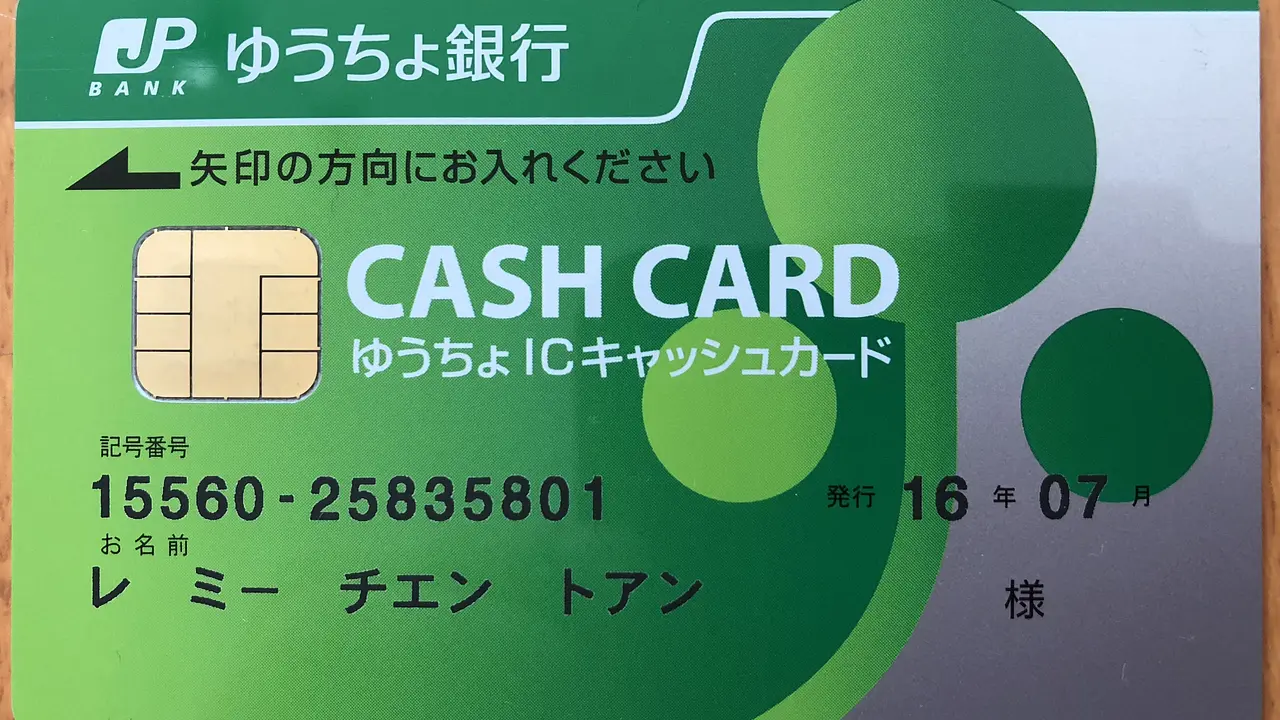
I find this method the most convenient. Just by looking at the symbol (記号) and number (番号) on the Yucho card, you can instantly figure out the branch code, branch name, and account number.
Branch Code
The branch code is created using the 2nd and 3rd digits of the symbol (記号) followed by the number 8. For example, as shown in the image, if the 記号 is 11940, then the branch code will be 198
Branch Name
The branch name for Japan Post Bank is simply the Kanji reading of the branch code. Using the example above, the branch code is 198, so the branch name will be イチキュウハチ (read as ichi-kyuu-hachi or one-nine-eight).
Account Number
The Yucho account number is derived from the number (番号) on the card by removing the digit '1' at the very end. In the example above, the 番号 is 1234561, so the account number used for transfers is 123456.
In cases where other banks require you to enter a 7-digit account number, you simply need to add a '0' to the beginning. So, in the example above, it would become 0123456.
Method 2: Look up Yucho branch codes online
Step 1: Access the website and enter card information
First, access the link below. This is the official Japan Post Bank website, so it is secure.
This is a Yucho card; the numbers on the card are separated by hyphens (-).
The first part of the sequence is the symbol (記号), consisting of 5 digits; enter this into the 記号 box on the website. The second part is the number (番号), consisting of 8 digits; enter this into the 番号 box on the website.
Step 2: Confirm the entered information
After you have finished entering the information on the first screen, select 入力内容の確認 (Confirm Entry Content) to verify.
A confirmation screen will appear. If there are no errors, select OK to look up the information.
Step 3: Retrieve information
On the information screen, you will see the necessary details such as the branch code, branch name, and account number.
Knowing how to find your Yucho branch code, branch name, and account number not only saves you time but also ensures your transactions go through smoothly and accurately. With the detailed instructions in this article, I hope you won't feel confused or waste any more time when looking up information for Japan Post Bank.
Thank you for reading! If you found this helpful, please share this article so more people can know about it ^_^
Hello everyone. I'm an IT engineer working in Japan. I created this blog to share about life and experiences during my study and work journey. I hope this article will be helpful to you.
No se entiende bien, la yucho card tiene 8 dígitos en el ejemplo pones 7, luego que si te piden 7 dígitos como te falta uno pones un cero, pero si el número de cuenta en la página del banco salen 7 números, 8 quitas uno 7, no te costaba nada usar los números de la tarjeta que pusiste de ejemplo, pero no te los inventas ayudando a la confusión